

How is it different from the chatbot we already tried?
It finishes the task. The chatbot tells you where the order is. The agent finds it, handles the problem with the carrier and only gets in touch if there is something for you to decide.

AI
agents
AI agents
A program that carries out a business task from start to finish. It reads what comes in, checks your systems, decides within set limits and acts, without anyone having to ask.
An AI agent is given a specific job, such as ‘process the orders that arrive by email’ or ‘check every supplier invoice against its purchase order’. To do it, the agent reads what comes in, looks up what it needs in the ERP or the CRM, decides and acts. It creates the order, posts the invoice or alerts the person responsible when something does not add up.
What sets it apart from a chatbot or a knowledge assistant is its main job. The chatbot answers; the assistant looks things up in documents; the agent acts. And what sets it apart from classic automation is that it copes with input that does not arrive in a fixed format. A badly written email, an invoice from a new supplier, an exception nobody programmed for.
If one AI agent can do this, picture what several specialist agents working in parallel can do: cover whole processes.
The three that come up in the first meeting, answered straight.
It finishes the task. The chatbot tells you where the order is. The agent finds it, handles the problem with the carrier and only gets in touch if there is something for you to decide.
Yes, if you have a repetitive process that today depends on someone reading, checking and typing. That is where an agent gives hours back from the first month.
The first agent in production takes 6-10 weeks. We start with a single process, on real data and with a person approving every action, and widen its permissions as it proves itself.
Six pieces delivered together. Without the last five, an agent is a demo; with them, it is a digital employee you can hold to account.
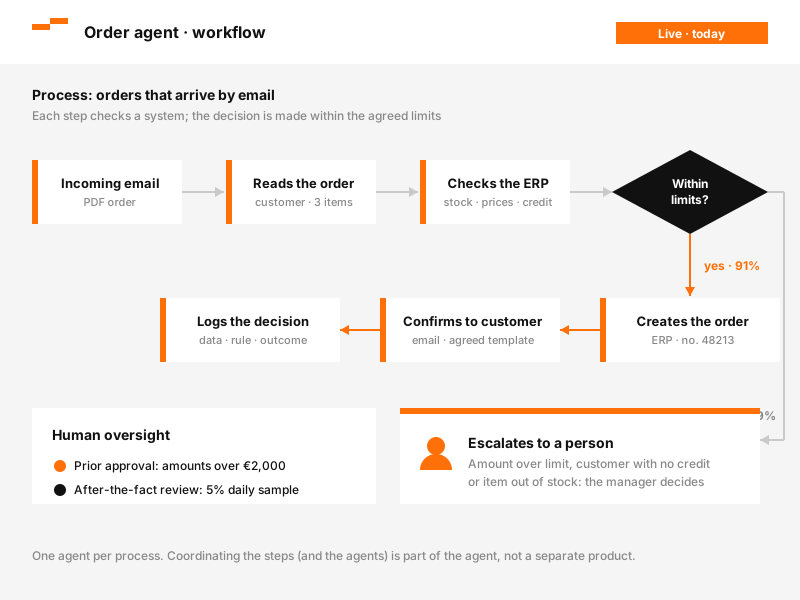
One agent per process: orders, invoices, incidents, restocking. Designed around how you work today, with the decisions it takes on its own and the ones it escalates written down before any code.
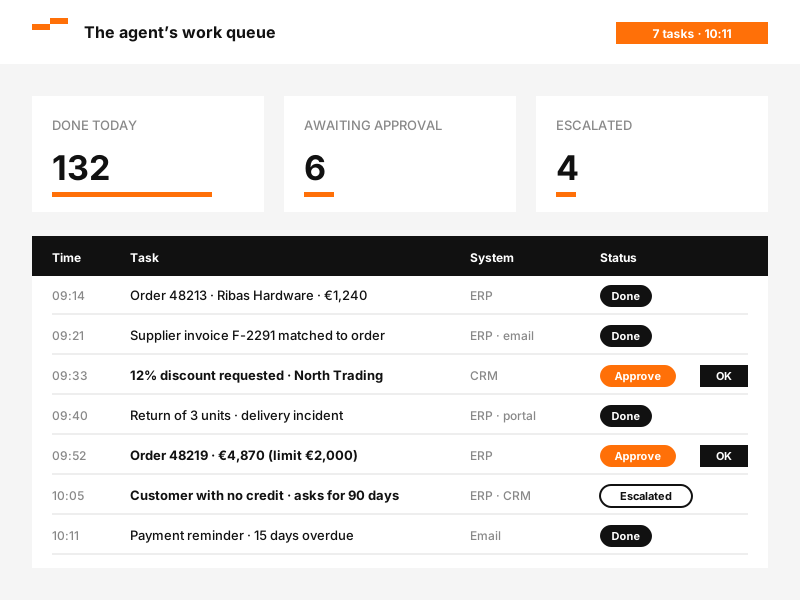
Every task goes through a queue: done, awaiting approval or escalated. The person in charge approves in one click and sees why the agent is proposing it.
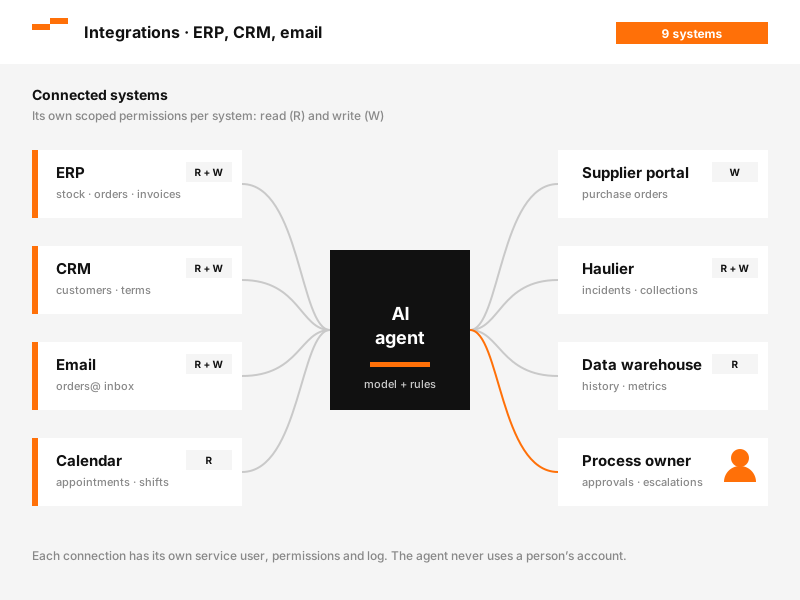
It reads from and writes to the ERP, CRM, email and calendar you already use, with tightly scoped permissions. If the data needs sorting out first, we deal with it through Data platforms.
Data platforms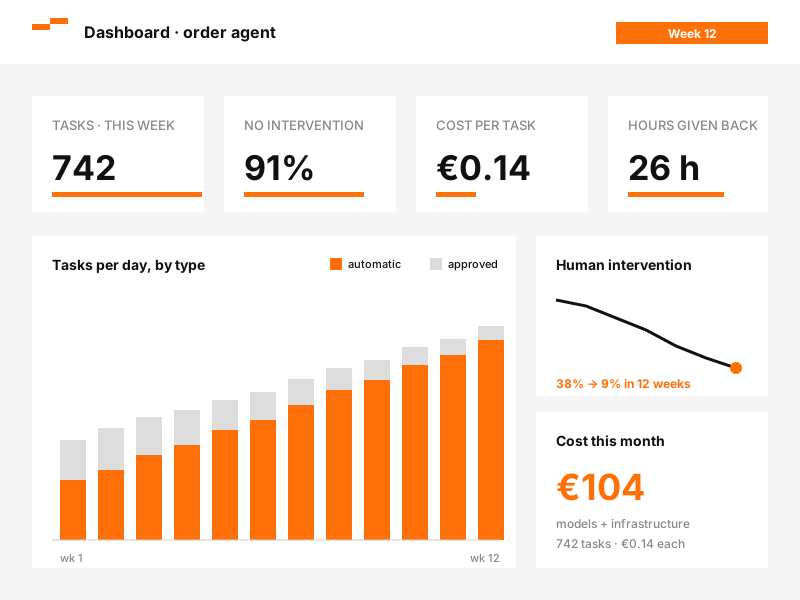
Tasks completed, time given back to the team, human intervention rate and cost per task. Those numbers decide whether the agent moves on to another process.
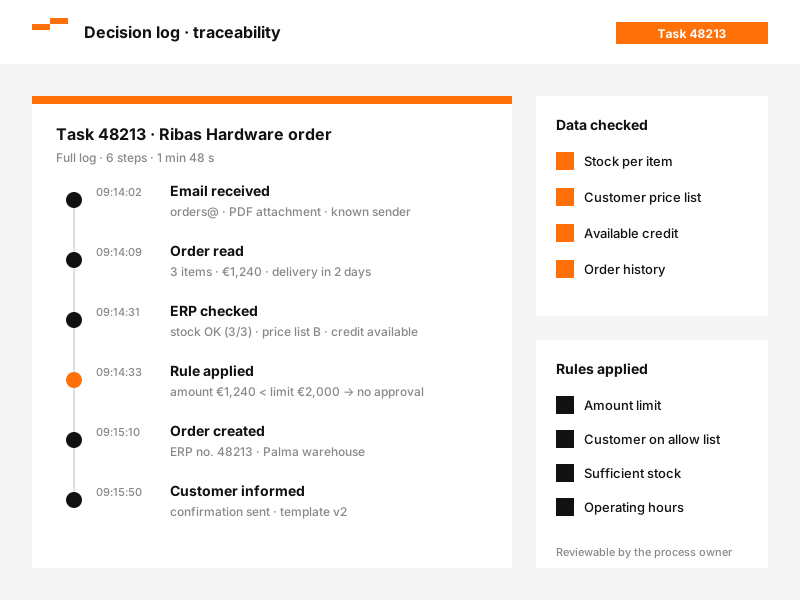
Which data it checked, which rule it applied and what it did, for every task. ‘Why was this approved?’ gets an answer in one click.
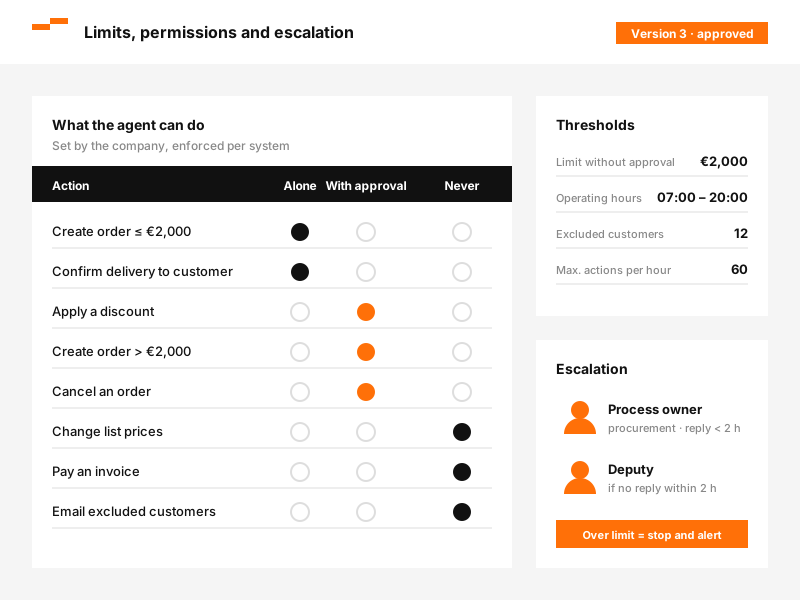
Maximum amounts, excluded customers, working hours and forbidden actions, all enforced by the system. And an escalation route for anything outside the norm.
Five steps. The agent touches nothing in production until the fourth.
Just one: repetitive, measurable and dependent today on someone reading, checking and typing. Logging the job sheets that come in from site is a good candidate. ‘Putting an agent in customer service’ does not yet say which task will disappear.
With the people who do the work today: what gets decided, with which data, what gets escalated and what is never touched. The agent's rules come out of this.
The agent is connected to your systems and runs in shadow mode: it proposes but does not execute. We compare its decisions with your team's until they match.
It starts with a person approving every action. Permissions widen task type by task type, as the log proves it is ready, and never all at once.
Control panel, costs, documentation and a trained owner in your team. If you would rather we run it, we agree that; the option of depending on nobody stays on the table.
The agent acts; the data tells it what to act on. An agent decides with whatever it finds in the ERP, the CRM and the inbox, and acts with whatever those systems allow it to do.
That is why an agent running on unreliable data does not fix the mess: it amplifies it, and at speed. If the stock figure in the ERP is not the real one, the agent will reorder what you do not need as diligently as it would have got it right. If ‘active customer’ means three different things, it will escalate what it should not and approve what it should have stopped.
In practice, many agent projects start with a review of the data the agent will use. From there they move on to a data platform when the sources are scattered, or to Business Intelligence when nobody has agreed the metrics. Neither is a compulsory first step: they are the ground that lets the agent stand firm.
Scattered datathe agent gets lost
Data in orderthe agent gets there

Order problems, changes and returns resolved from start to finish: the agent finds the order, checks stock, deals with the carrier and replies. A person steps in only for the exceptions.

Supplier invoices read, matched against purchase order and delivery note, and posted. The ones that do not match reach accounts with the difference already flagged.

The agent spots the need, prepares the supplier order with current lead times and terms, and leaves it ready for approval. It almost always shows how much was being ordered out of habit.

Payment reconciliation, overdue tracking and reminders in the agreed tone, at the agreed time. Finance stops chasing and starts deciding on the difficult cases.

Last-minute changes to routes, appointments or shifts. The agent reassigns within the rules, tells whoever needs to know and records what changed and why.
What people ask before letting a system act inside their ERP. If yours is missing, write to us.
Let's talk about your projectIt depends on the systems it touches and on how many different decisions it takes, not on the volume of tasks. On top of the project there is a recurring cost for model usage and operation. The price is fixed once we have seen the process, which is when it can honestly be known.
The chatbot answers. The knowledge assistant answers from your documents and cites the source. The agent executes: it checks, decides and acts in your systems. It can use a knowledge assistant as one of its tools.
A clear process and access to the systems where it lives (ERP, CRM, email). You do not need a data warehouse; if your sources are scattered, we will tell you in the first session.
It acts within limits the system enforces, every action is logged and the risky ones go through human approval. A mistake is reversed and turned into a rule.
Only what each task strictly needs, under contracts that rule out its use for training. If your policy requires it, we can work with open models hosted in your own environment.
The agent is yours: code, rules and documentation. We can run it for a monthly fee or train your team to run it.
Wherever there is repetitive work that takes judgement and can be counted in hours. It leads the way in travel and hospitality, answering enquiries overnight and in several languages, and in logistics and supply chain, where someone keys in orders that arrive by email. In construction and engineering it comes second, once tender documents and site minutes can be searched.